Intelligent multimedia for worship
The right verse on screen before you've found it.
QolCast listens to your service and projects scripture being preached on screen in real time, on every display you run, then hands you sermon notes, captions, and chapter markers afterward. It works alongside your operator, never instead of them.
For God so loved the world, that he gave his only begotten Son, that whosoever believeth in him should not perish, but have everlasting life.
The verse gets quoted.
The slide isn't ready.
The pastor goes off script and quotes a verse from memory. In the booth you're typing the reference, checking the translation, and hoping you heard "Romans 8" and not "Romans 12." By the time the slide is up, the sermon has moved on.
Services shouldn't feel like a race you can only lose.
How it works
Listen. Detect. Display.
-
01
Listen
QolCast takes the same mic feed your sound desk already has and transcribes the service as it happens. Nothing new on stage.
-
02
Detect
It recognises scripture as it's spoken, whether it's "John 3:16" or a verse quoted from memory, and finds the passage in your translation.
-
03
Display
The verse is staged in your operator's preview, or goes straight up if you've turned on Project Directly. Either way it's styled and legible from the back row.
Story and paraphrase detection
It even catches the stories.
Pastors rarely read chapter and verse. They say "remember the story of the lost son" or "by his stripes we are healed." QolCast hears the story and finds the passage, not just the references that are spelled out.
Nothing reaches the screen on its own. By default every match waits in Preview until your operator sends it live. If you'd rather move faster, switch on Project Directly and detected verses go straight to the screen.
Features
Built for the booth.
Everything your operator needs on a Sunday, and what the media team needs on Monday.
In the console
A broadcast-style workflow
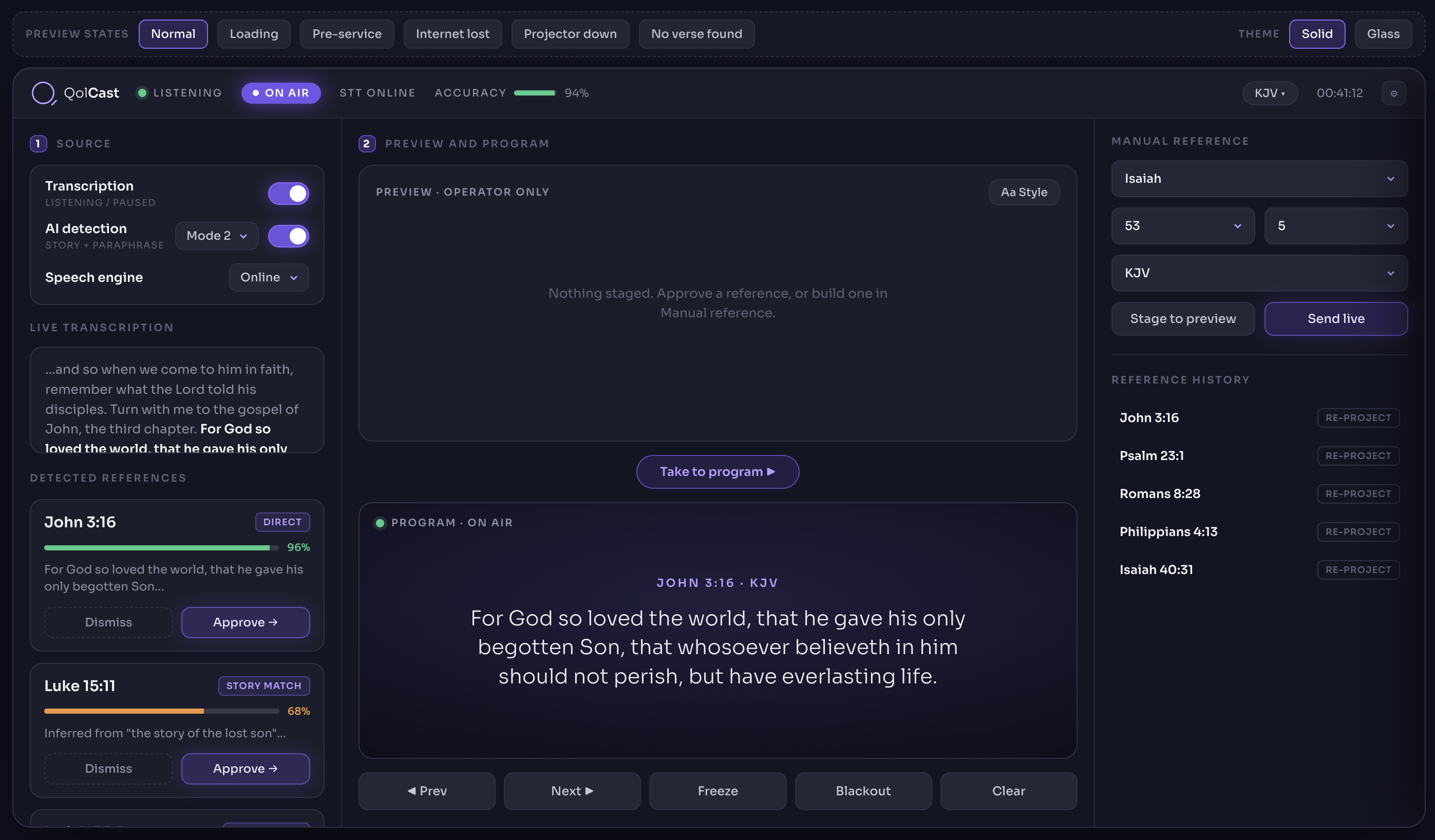
Preview, Program, and on air, the way anyone who's run a switcher expects. Stage a verse, check it, take it live. Freeze, Blackout, and Clear are always one click away.
Any verse, when you need it
Pull a passage by book, chapter, verse, and version whenever you want to drive. Everything that's gone live is kept in the reference history, one click from the screen again.
On every screen
Auditorium display
A dedicated output window for the main screen, with its connection status always in view.
Several NDI feeds at once
One for the lobby, one for the livestream, one for a confidence monitor. Each has its own name, style, and current or next verse.
Clean overlays
NDI feeds carry true transparency, so text keys straight over camera in OBS or vMix. No logo, no borders.
Style presets
Set font, size, colour, and position with a live preview. Save it as "Lower third" and assign it to any output.
After the service
Sermon notes
A recap with key takeaways and discussion questions, ready to share with small groups the same afternoon.
Captions
SRT and VTT files built from the transcript, for the recording, the podcast, and anyone who needs them.
Chapter markers
Every verse and its timestamp, ready for YouTube or your podcast. "00:12:34 Romans 8:28" without scrubbing.
Clip suggestions
Quotable moments flagged with timestamps, so your media team starts from a shortlist, not the whole recording.
Augment, not replace
Your operator stays in the driver's seat.
QolCast suggests. Your operator decides. Every reference lands in a preview first, with the confidence to back it up. Approve, dismiss, freeze, blackout, or type a reference by hand. The same controls a booth has always had, with less to hunt for.
- Preview before program, always
- Confidence shown on every match
- Manual reference and blackout one tap away
How it fits
Fits the setup you already have.
Your mic feed
One audio line from the desk. No new microphones, no one on stage wearing anything extra.
Online or offline
If the building's internet drops mid-sermon, the local speech engine keeps listening.
Your translations
KJV, ESV, NIV, and more. Set a default and switch per service or per verse.
Your data stays yours
Transcripts, archives, and prayer requests belong to your church. Export or delete them any time.
Take the pressure off your next Sunday.
We're onboarding a small group of churches ahead of launch. Tell us where to reach you.
No demo scheduling, no sales calls. We'll email you when your spot opens.